
React系列:第八回(createElement、render)
本文开始,我们将用几篇文章记录下,我们的my_react的实现逻辑。
类似于vue的学习过程,我们将尝试手写react的重要组成部分,以便更为彻底的理解其底层实现。涉及的内容包括:createElement、render、cocurrent mode、fiber、render commit、reconcilliation及function components。本文介绍createElement和render
渲染整体逻辑
const content = React.createElement(
    'div',
    {
    title: 'title',
    id: 'id',
    },
    '川崎重工'
)
console.log('content>>>', content)
const root = ReactDOM.createRoot(
    document.getElementById('root')
);
root.render(content)从上面代码不难看出,通过调用createElement,会生成一种dom的数据结构,具体长啥样根据入参决定。这一块的内容我们之前在介绍vue底层时有提到过,他们都是根基于一个库snabbdom.就是通过结构化的数据, 去描述dom节点,就是所谓的虚拟dom。然后做的事情就是render, 将结构化的数据转换成真实的dom,挂载到页面中去。具体长这样: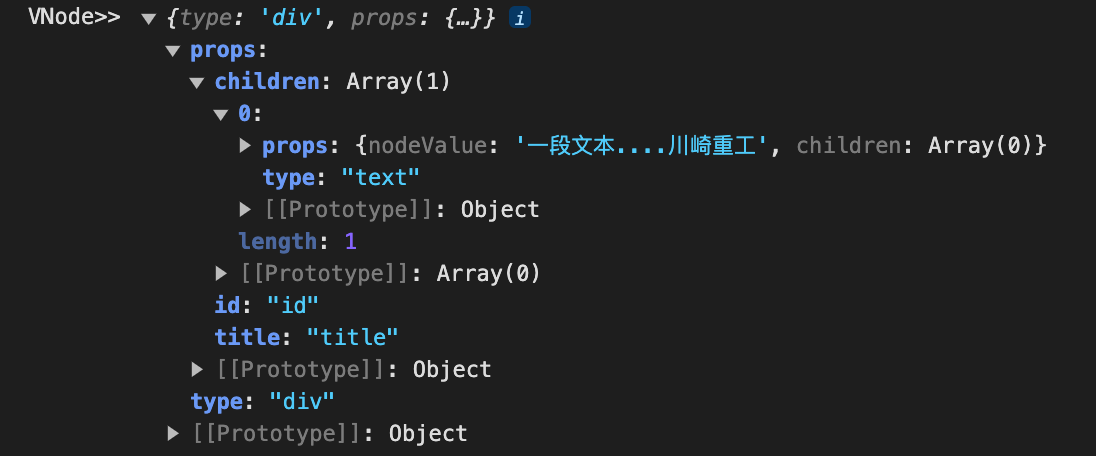
效果:
diy之
完整代码
<!-- html -->
<!DOCTYPE html>
<html lang="en">
    <script src="./MyReact.js"></script>
    <!-- <script src="./MyReact2.js"></script> -->
<head>
    <meta charset="UTF-8">
    <meta http-equiv="X-UA-Compatible" content="IE=edge">
    <meta name="viewport" content="width=device-width, initial-scale=1.0">
    <title>My_react</title>
</head>
<body>
    <div id="app"></div>
</body>
<script>
    // 1.React官方使用
    // const content = React.createElement(
    //     'div',
    //     {
    //     title: 'title',
    //     id: 'id',
    //     },
    //     '川崎重工'
    // )
    // console.log('content>>>', content)
    // const root = ReactDOM.createRoot(
    //     document.getElementById('root')
    // );
    // root.render(content)

    // 2. diy版本

    const VNode = myCreateElement(
        'div',
        {
            title: 'title',
            id: 'id'
        },
        '一段文本....川崎重工'
    )
    console.log('VNode>>>>',VNode)

    const container = document.getElementById('app')
    myRender(VNode,container)
</script>
</html>
// js 原始粗暴版
const createTextNode = (child) => {
return {
type: 'text',
props: {
nodeValue: child,
children: []
}
}
}
const myCreateElement = (type, props, ...children) => {
console.log('children>>>', children)
return {
type: type,
props: {
...props,
children: children.map((child) => typeof child === 'object'? child: createTextNode(child))
},
}
}
const myRender = (element, container) => {
const dom = element.type === 'text'? document.createTextNode(element.props.nodeValue): document.createElement(element.type)
// 更新非children参数
Object.keys(element.props).filter((item) => item !== 'children').forEach((item) => dom[item] = element.props[item])
element?.props?.children?.forEach((child) => myRender(child, dom))
container.appendChild(dom)
}通过myCreateElement生成虚拟dom,myRender实现挂载,也就是创建真实的dom并加载到页面中。
效果如下:

文毕。
All articles in this blog are licensed under CC BY-NC-SA 4.0 unless stating additionally.