
性能的考量:第五回(长任务)
关于性能问题,我们前文介绍过了八股文篇、实战版本以及canvas性能相关的实操。今天,我们结合前文介绍过的google的performance工具,来更加深入的聊一聊。
在web性能领域,有一个单独的单词long task,就是所谓的长任务。一般来讲,耗时超过50ms即可被认为长任务。这种长任务会导致什么结果呢?大佬解答:
If the user is attempting to interact with the page while a long task runs—or if an important rendering update needs to happen—the browser will be delayed in handling that work.
简言之:卡死你。
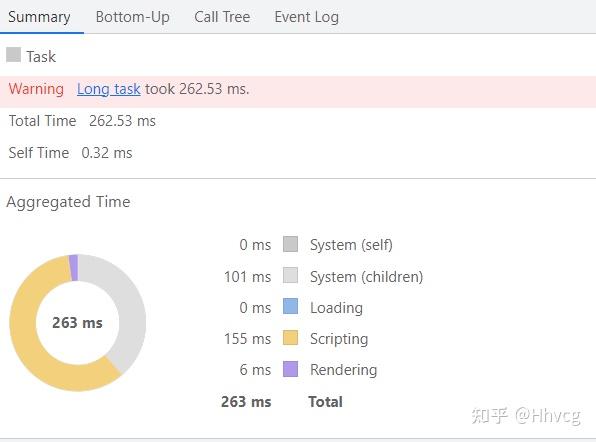
以目下的一个业务场景为例。该项目的某个页面加载耗时,长达6s。打开performance工具分析发现,符合长任务定义的操作,存在还不止一个,且单个耗时远超50ms,如下图所示:
针对上述的“long task”,我们怎么优化呢?
- 异步化任务
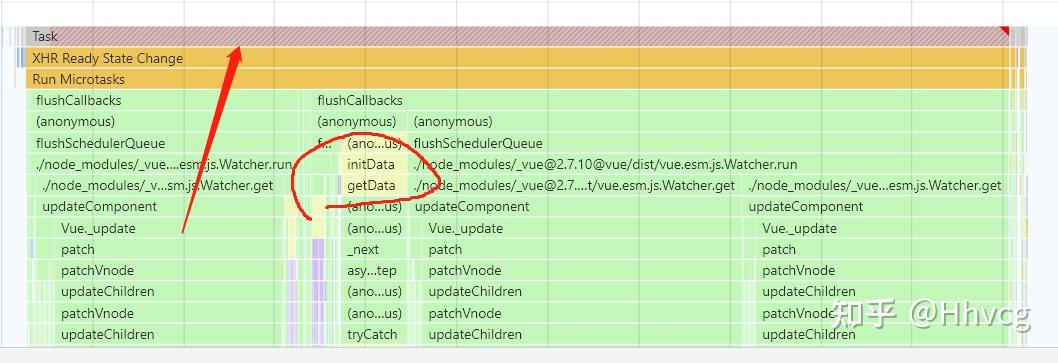
依据向主线程妥协的原则,有些场景下的一些任务,不需要等待他完成。例如页面中有个列表模块,初次加载页面用户是看不到的,只有当我们点击了按钮后才会显示。那么对于这个组件的js代码,我们就可以将它从主线程剥离出来。
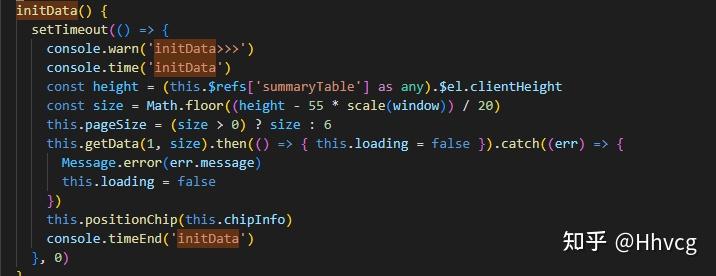
图中的iniData函数就是该组件触发的。单单这一个函数额耗时,就超过了50ms。为此,我们可以用定时器剥离之。(注意,不一定非得用定时器,promise等都可以)我们现在再来看一看总的long task的情况:
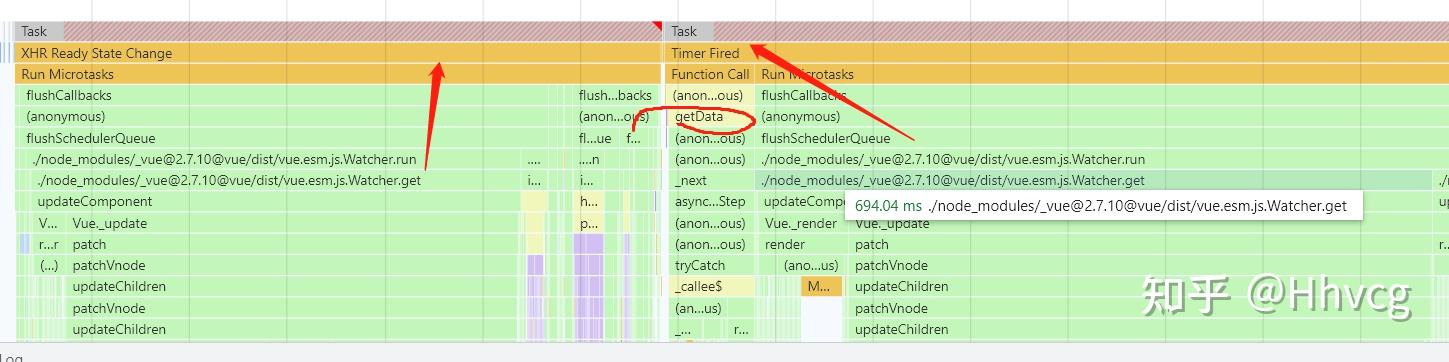
结果就是:原本一个巨长的long task,被一分为二。
关于为什么要将任务尽可能地切分 官方解释:
This matters because when tasks are broken up, the browser has more opportunities to respond to higher-priority work—and that includes user interactions.
白话就是,通过这种分解长任务,使得浏览器有更多的机会去处理其他高优先级的事情,比如响应用户的互动操作。如下图所示: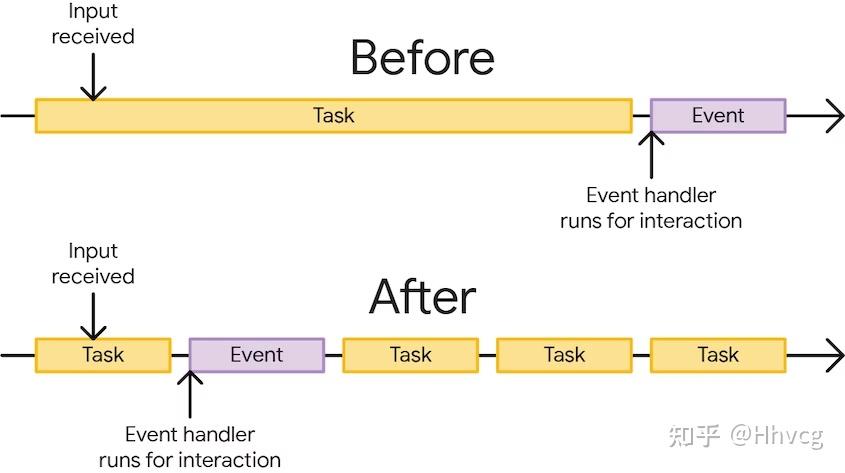
所以,将一些用户不可见的操作异步化,能够很好的切分long task。
但是吧,某些情况下,没法通过定时器这种方式,比如有一个很大的数组,我们需要遍历其中的每一项做一些操作。可能每一项处理的速度很快,但是因为数量过大导致总的时间长。这种情况下咋搞?
function processData () {
  for (const item of largeDataArray) {
    // Process the individual item here.
  }
}方案就是使用其他的api,比如requestIdleCallback、postMessage等。其中的RequestIdleCallback就是我们之前说的raf,帧内执行回调,但需要注意的是,执行的条件是帧内有空闲时间(idle),所以优先级略低。
worker
如果纯粹是计算量过大,那我们完全可以将计算的工作扔给worker去处理即可,毕竟从主线程的角度来看,我们需要的仅仅是所需的数据而已。使用async/await
Yielding to the main thread creates opportunities for critical work to run sooner.
优先级调度机制
scheduler.postTask(() => {
  console.log('1')
}, { priority: 'background' })
scheduler.postTask(() => {
  console.log('2')
}, { priority: 'user-blocking' })
scheduler.postTask(() => {
  console.log('3')
}, { priority: 'background' })postTask去指定任务的优先级别。包含三个选项:user-blocking、user-visible、background。但是该api尚未成为标准,须谨慎使用。
总结
- Yield to the main thread for critical, user-facing tasks.
- Use isInputPending() to yield to the main thread when the user is trying to interact with the page. 3. Prioritize tasks with postTask().
- Finally, do as little work as possible in your functions.
严重参考文档: https://web.dev/optimize-long-tasks/?utm_source=devtools